

Mobile Legends PH and GLOBAL
GLOBALHOW TO TOP-UP MOBILE LEGENDS WITH SPECIAL ITEM ON NEXONE PH
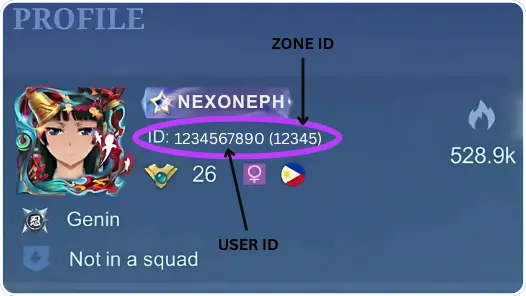
1. Enter your Mobile Legends User ID and Zone ID,
Example: 123456789 (1234)
2. Select the Diamond amount you want to purchase.
3. Complete payment using any PH e-wallet or bank.
4. Diamonds are delivered to your MLBB account once payment is confirmed.
⚠️ REMINDER:
Always check your Weekly Diamond Pass limit before buying to avoid delays or failed transactions.
Select Item
Special Items
Diamonds
Review
5.0
from 11,619 reviews
******
2398 Diamonds (2015 + 383 Bonus)
26 Sep 2026, 00:11
"Diamonds credited instantly. No issues."
john***********@gmail.com
1x qty 570 Diamonds (504 + 66 Bonus)
26 Sep 2026, 00:16
"Fast and legit. Will order again."
fren********@yahoo.com
1x qty 570 Diamonds (504 + 66 Bonus)
26 Sep 2026, 00:17
"Correct amount received, fast service."
******
299 Diamonds (272 + 27 Bonus)
26 Sep 2026, 00:24
"Fast and legit. Will order again."
jpen**********@gmail.com
1x qty Weekly Diamond Pass (One time purchase)
26 Sep 2026, 00:25
"Affordable and instant delivery."
Account Details
Guide
Voucher Code
Enter Voucher Code
Payment Method
Order Confirmation
Transaction Receipt (Required)
Required: You must enter email to receive a transaction receipt

Mobile Legends Diamonds Top Up – With Special Item
Mobile Legends players with Philippine-region accounts can purchase MLBB Diamonds With Special Item through Nexone.ph. This page is intended for users who want to top up Diamonds With Special itrem using local payment options without relying on in-app purchases.
Nexone.ph supports Philippine payment methods such as GCash, Maya, and QRPH. This MLBB Diamonds top up service is tailored for Philippine users, with the ordering process based on Player ID and Server ID to ensure the selected package is applied to the correct account.